 The Tracking Wiki
Peplink
Device Setup
Peplink devices can be configured to report to the tracking portal via the router’s Web Admin Interface. It can be accessed locally by visiting: http://192.168.50.1
The default username and password is ‘admin’.
Once logged into the Web Admin Interface, GPS Forwarding can be setup:
- Navigate to Advanced > GPS Forwarding
- Set/verify the following fields:
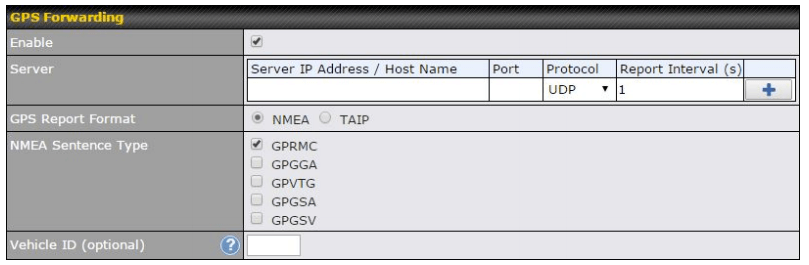
| Field | Value |
|---|---|
| Server | protocolparser.com |
| Port | 4819 |
| Protocol | UDP |
| Report Interval | The desired reporting interval |
| GPS Report Format | NMEA |
| NMEA Sentence Type | GPRMC |
| Vehicle ID* | Same as IMEI/Unit #/Device ID entered on tracking portal |
* Note that the Vehicle ID is not automatically assigned by PepLink so you must create it yourself and it must match with the tracking portal.